Quick Sale Setup
The Quick Sale Setup menu allows users to add retail items to a quick sale category. The quick sale category name is displayed in the Shop screen. Users can add items to the cart from the quick sale category.
Perform the following steps to add quick sale items:
Navigate to Settings à Retail Setup à Quick Sale Setup.
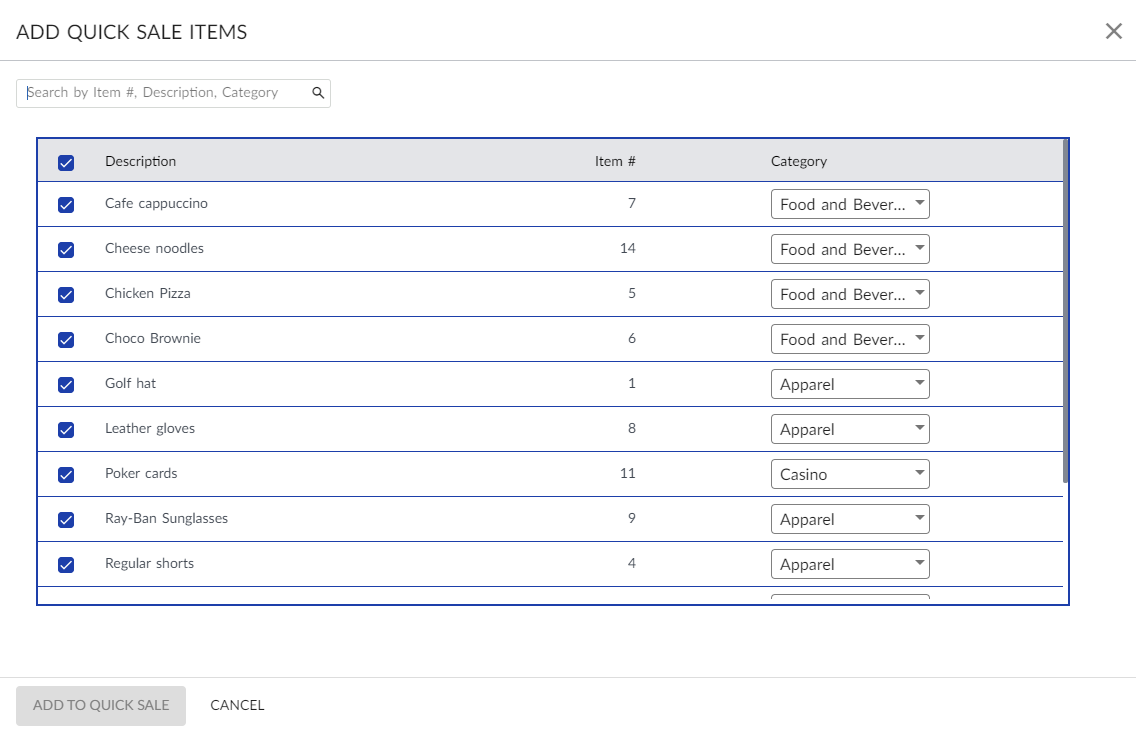
Click Add Quick Sale Items to add a new item. The Add Quick Sale Items screen is displayed.
Select the preferred items to add to the quick sale list.
Select a quick sale category for each item from the Category drop-down list.
Click Add To Quick Sale. The items are now added to the quick sale items list.
Users can also perform the following actions in the Quick Sale Setup screen:
-
An item from the list on the Quick Sale Item screen can be searched by entering the name of the required item in the search bar.
-
The Delete icon allows users to remove quick sale items from the preferred quick sale category. The Retail Items screen will be updated based on the deletion.
-
The Drag option allows users to drag and change positions of the quick sale categories displayed within the selected outlet.
-
Users can rearrange the order in which the quick sale items can be displayed by selecting the item and moving to the preferred position. Based on this order, the quick sale categories and quick sale items will be displayed in the Retail Items screen (Shop à Retail Items screen).